
Plans and limits
Fidelip has three plans and a handful of operating limits. This page puts both in one place: what each plan costs, what exactly happens when you reach a limit (reaching one almost never switches the service off), and how to change, cancel or reactivate your subscription.
The three plans
| Plan | Price | Billed per | Who it's for |
|---|---|---|---|
| Surveys | $19 USD/month $190 USD/year | Business (flat rate) | You only want to measure satisfaction: NPS, CSAT, stars, kiosk mode. No loyalty card. |
| Surveys + Loyalty | $49 USD/month $490 USD/year | Location | The full plan: Wallet cards, stamps, points and membership benefits, surveys, referrals, automations. |
| Enterprise | Custom | Contract | Chains and franchises that need unlimited customers, API keys to connect their point of sale or ERP, a report by location and product analytics. |
These are United States prices, before sales tax; other countries are billed in their own currency (see the home page). The first 10 days are free on any self-serve plan, and your card isn't charged until the trial ends. There is one free trial per business: if you cancel and subscribe again, the first charge is that same day (see If your subscription is suspended or canceled). Annual billing equals paying for 10 months.
Extras
Extra location and extra card apply only to the Surveys + Loyalty plan; the first of each is included. Extra surveys and extra responses can be bought on any plan that includes surveys, without changing plan. You add or remove those four extras in Dashboard → Billing, under Change plan.
| Extra | Monthly | Annual | When you need it |
|---|---|---|---|
| Extra location | +$19 USD | +$190 USD | You open another location. Customers use the same card at all of them. |
| Extra card | +$19 USD | +$190 USD | You want a second program running at the same time (for example coffee stamps and food points). |
| Extra survey | +$9 USD | +$90 USD | You want more than 1 active survey at a time (for example one for service and one for product). |
| Extra responses | +$9 USD | +$90 USD | Each block adds 10,000 more responses a month. |
| Email credits | $99 MXN / 500 emails · $179 MXN / 1,000 emails · $399 MXN / 2,500 emails | No expiry | You ran out of the credits included for the month. It's a one-time payment, and packs are sold in Mexican pesos only, whatever your country. You buy them in Dashboard → Billing, on the Email credits tab. |
Every limit, and what happens when you reach it
You can see how far along you are on each limit in Dashboard → Billing, under What you use of your plan.
| Limit | Value | What happens when you reach it |
|---|---|---|
| Registered customers | 10,000 (Surveys + Loyalty plan) | Every registered customer counts, whether or not they were active recently. At 80% you get a warning email. At 100%, only new sign-ups from the public page are blocked: existing customers keep earning and redeeming, and nothing is deleted. The Enterprise plan has no limit. |
| Active surveys | 1 included | You can create more as drafts (inactive): they don't count. To turn another on, the owner adds an extra survey from Billing for $9 USD a month, without changing plan, or you turn off one you no longer use: its slot frees up instantly. The Enterprise plan has no limit. |
| Responses per month | 10,000 included | A response is never rejected. If a customer is answering on the tablet, their response is saved even if you're past the limit. At 80% the response meter for your surveys turns to a warning, so you can add a block of 10,000 for $9 USD a month. The Enterprise plan has no limit. |
| Email credits | 500 a month | Each email in a campaign or a voucher uses 1 credit. The monthly ones renew on the 1st; purchased ones never expire. A campaign with more recipients than credits isn't sent (it's refused whole, not sent halfway), and with no credits a voucher's email isn't sent, but the voucher stays valid: the customer sees it in their portal and at the counter. You're never charged extra automatically: you buy a pack in Dashboard → Billing, on the Email credits tab, and sending resumes. |
| Staff accounts | 5 per location | The system rejects assignment number 6. Deactivate an account that's no longer used (inactive ones don't count) or assign that person to another location. |
| Kiosk accounts | 50 per location | Plenty for any real venue; if you reach it, write to us. |
| Active locations and cards | As many as your plan pays for (Surveys + Loyalty) | The first location and the first card are included; each extra you add covers one more. You can't create or turn on another beyond what you pay for: the dashboard asks you to deactivate one or add the extra in Change plan. You also can't pay for fewer locations than you have active. The counter keeps working and nothing is deleted. |
| Card notifications | 1 a day, per card | It counts your business's day, even if you pick an audience. In Dashboard → Marketing → Messages and birthdays, the Send message button is disabled until the next day. Automatic messages (birthdays, automations) don't use up your send for the day. This is on purpose: the notification shows on the lock screen, and two a day is the fastest way to make people delete your card. |
| Image changes | 3 a day, per type | Each logo, banner or stamp change regenerates the artwork and pushes an update to every installed pass, so it's watched. It's a warning, not a block: the editor tells you how many changes you have left today and, at the limit, still lets you save, but installed cards may take longer to update. |
| Stamps per card | A fixed maximum | It's a design limit: the Wallet banner fits at most two rows of stamps, and beyond that it stops being legible. The card editor shows you the allowed range. If you need longer goals, use a points card. |
| Survey bonus | A cap per customer | Anti-abuse, per customer card: there is a minimum wait between one bonus and the next and a maximum number of bonuses per week. The response is always saved; only the bonus is skipped. It stops someone from answering surveys back to back to rack up points. |
What the Enterprise plan unlocks
On top of removing the customer limit, the Enterprise plan includes:
| Feature | What it does |
|---|---|
| API keys | In Dashboard → Business → Integrations you create one key per system or location and choose what it allows: Record purchases (your point of sale or ERP adds the points or stamps of each sale on its own, with the same rules as the app) or Read reports and surveys (another system reads your loyalty and survey stats). The full key is shown only once. Your system has to be able to connect through an API or webhooks: if it ships with that turned off, ask its provider to turn it on. If you leave Enterprise, read keys keep working and keys that record purchases stop. |
| Balance by location | In Dashboard → Business → Balance by location: what each location issued and what it redeemed in the period, which you can filter by card and export. It isn't a balance per location: a card belongs to the person, not to the location. |
| Partner companies | In Dashboard → Business → Partner companies: agreements with companies, with their list at signup, a monthly allowance per agreement that is deducted at the register, and a usage report per company. |
| Product and category analytics | When your point of sale sends the products of each sale, you see the best sellers and each category in Dashboard → Overview, and in Dashboard → Customers you find who bought a product or a category. |
The Enterprise plan is quoted by contract. Write to us at [email protected] with the number of locations, the approximate number of customers and which system you want to integrate.
Change or cancel
Everything is done from Dashboard → Billing, which only the owner sees. It has three tabs, Plan, Tax details and Email credits, and a Manage payments button that opens Stripe's portal so you can update your card and see your invoices.
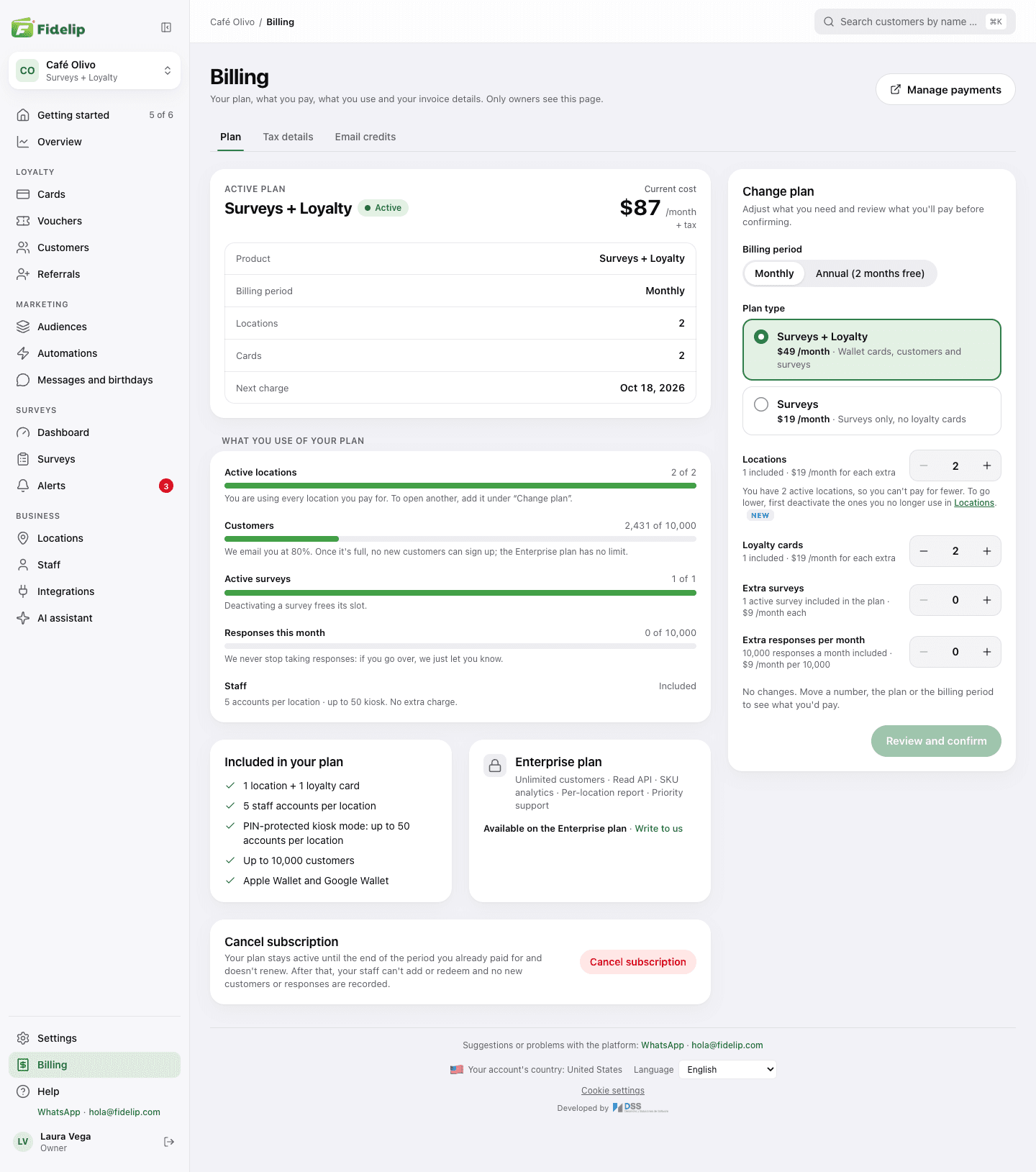
On Plan you see your Active plan with its status, the Current cost and the Next charge; below, What you use of your plan and Included in your plan. Next to that is Change plan: there you change the Billing period (monthly or annual), the Plan type and what you buy, with the counters Locations, Loyalty cards, Extra surveys and Extra responses per month. As you move the numbers, What changes shows the New cost at list prices; Review and confirm asks Stripe for the exact amounts and opens Confirm changes, where you see what is charged today, your next invoice and what you'll pay After that. Nothing is applied until you click Confirm changes; Back or Discard leaves everything as it was.
Changes apply the same day and you pay only the prorated part: what you add is charged for the time left in the period, and what you remove becomes a credit toward your next payments. Switching from monthly to annual (or back) starts the new period today and deducts the time you didn't use. During the free trial nothing is charged. Three more rules:
- You can't pay for fewer locations than you have active: first deactivate the ones you no longer use in Dashboard → Business → Locations.
- Moving to Surveys removes Cards, Customers, Referrals and Messages and birthdays from the dashboard and stops charging for extra locations and cards. Cards your customers already saved on their phones are not deleted.
- The Enterprise plan isn't changed here: the Your Enterprise plan card sends you to write to sales.
Tax details keeps the legal name and tax ID your subscription is invoiced under (in the United States, your EIN; in Mexico, the RFC, tax regime and CFDI use) and syncs with Stripe. Email credits shows how many you have left this month, the ones you bought and the packs.
To cancel, click Cancel subscription at the bottom of the Plan tab and confirm with Yes, cancel (Keep plan leaves it as it was). The subscription stays active until the end of the period you already paid for and doesn't renew; there is no penalty and no minimum term. Until that day everything works and the Plan tab shows you the date: if you change your mind, Reactivate puts it back as it is today, with no new payment.
If your subscription is suspended or canceled
There are two reasons the dashboard and the counter app stop, and the screen tells you which. In both, your data is untouched: customers, cards, surveys and settings stay saved.
- A charge failed. The whole dashboard, Billing included, is covered by Subscription suspended, which says we couldn't charge your latest invoice and offers Pay now and Update payment method. The counter app shows its own suspended notice. Until it's paid, staff can't add purchases or redeem rewards, and no new customers or responses are recorded. Everything comes back as soon as Stripe confirms the charge; if you already paid, it can take a few minutes.
- The subscription ended (you canceled it and the period ran out). The dashboard is covered by Subscription cancelled, with the same effect at the counter. The owner sees Reactivate subscription and doesn't need to write to us; everyone else reads Only the owner can reactivate it.
- Start from the noticeClick Reactivate subscription. It takes you to Dashboard → Billing, the only page the notice doesn't cover.
- Review your planThe page is titled Reactivate your subscription and starts with the plan you had: billing period, locations and cards. Change them before paying if you like. In Order summary, Charged today reminds you there's no second free trial: you're charged right away.
- PayClick Continue to payment and pay by card on Stripe, like the first time. If you close Stripe without paying, you come back to the form, the page says no charge was made and the subscription stays canceled.
- Wait for the confirmationWhen you come back, the page says We're confirming your payment… and within a few seconds the notice disappears on its own, across the whole dashboard and without reloading. If Stripe is slow, the page says Your payment is being processed and offers Check again: wait, and don't pay again.
When you reactivate, keep in mind:
- The extra surveys and extra responses you had don't carry over: buy them again in Change plan. Nothing is deleted; you just can't turn on more surveys than your plan covers.
- If your plan was Enterprise, it can't be bought again online: the form offers Surveys + Loyalty and a link to write to us if you want the same terms.
- If you asked to delete the business, the notice is different: first click Cancel deletion, then reactivate.
- In Europe, the notice for an ended subscription says until which day your data is kept; reactivating cancels that deletion.